The simplest way to put video, images and audio on your LED screen. Built for live events, churches, weddings, and concerts . Running on Windows and Mac. No complexity, no subscription.
Used atChurch ServicesWedding CeremoniesConcert PerformancesCorporate EventsSchool ProductionsCommunity Festivals
Features
Everything you need. Nothing you don't.
StageCue does one job and does it perfectly — getting your media onto the screen, reliably, every time.
⚡
Instant CUT Transition
Load media into Preview, hit CUT and it's live on your LED screen. Your audience sees it the moment you press the button.
🖥
Automatic LED Output
Connect via HDMI, click FULL SCREEN — StageCue automatically detects your second display and opens fullscreen with zero extra steps.
🎬
Plays Everything
MP4, MOV, AVI, JPG, PNG, GIF, MP3, WAV and more. Drag files straight into the playlist — thumbnails generate automatically.
◈
Smooth Transitions
CUT for instant switches. FADE for smooth crossfades. WIPE for reveals. FTB (Fade to Black) for clean blackouts between sections.
🎵
Audio Device Control
Route audio to any device — HDMI, speakers, Bluetooth, headphones. Independent volume for preview and output.
📋
Save & Load Playlists
Save your playlist to a file and reload it next time. All media reloads in the exact same order, thumbnails and all.
Concert for Care — Live Performance
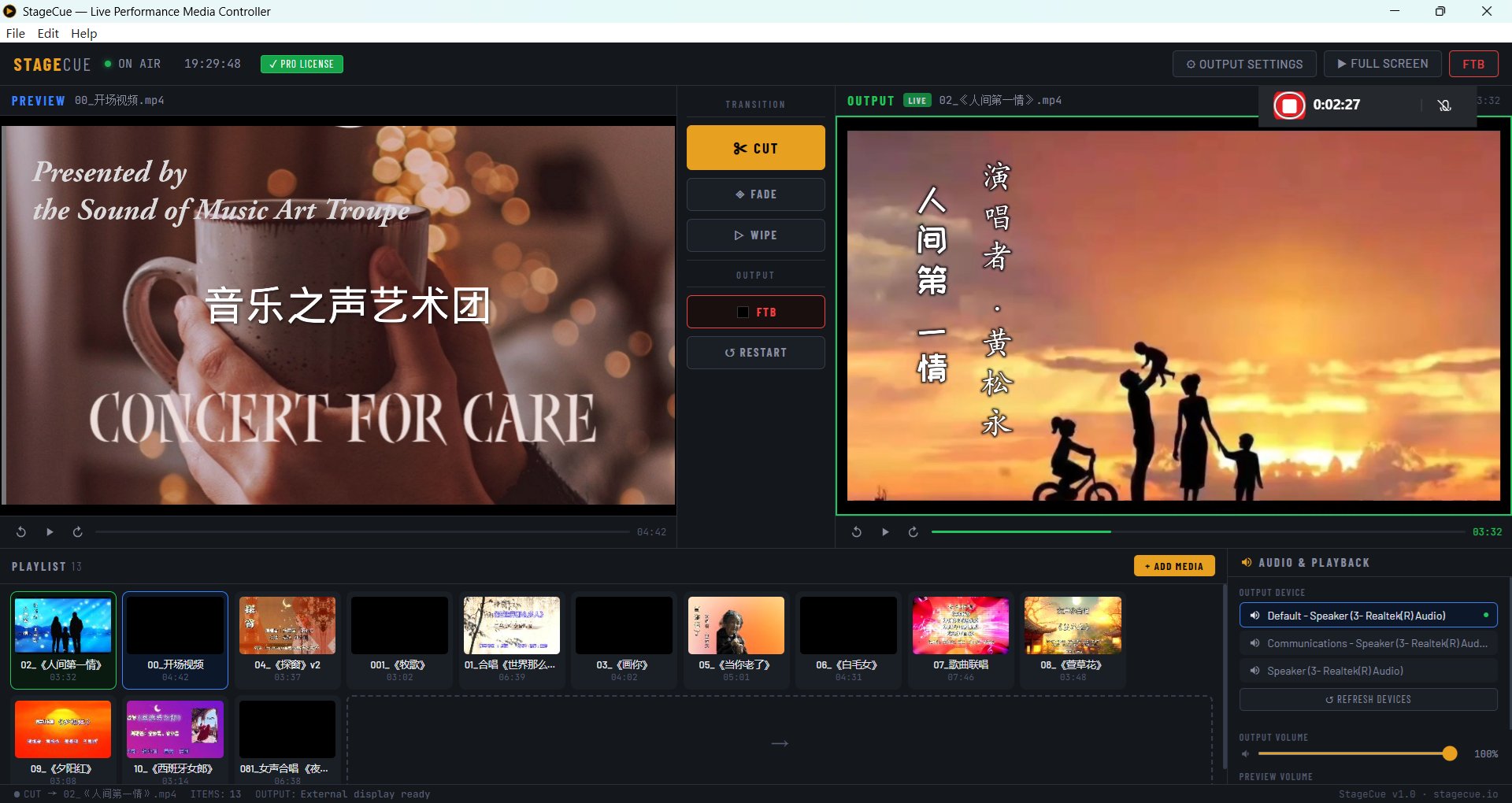
Preview window shows the next video ready to go. Output window plays live on the LED screen. 13-item playlist loaded and ready. One operator, zero stress.
Workflow
Up and running in 2 minutes.
No training. No manual. Just open, load your media, and go.
01
Add Your Media
Drag and drop video, images and audio into the playlist. Thumbnails generate automatically.
02
Preview First
Click any item to load it into the Preview window. Check it looks right before anyone else sees it.
03
Click FULL SCREEN
StageCue opens fullscreen on your HDMI display automatically. Your LED screen is ready to go.
04
Hit CUT
Press CUT (or Enter on keyboard) and your media is live. The next item loads into Preview automatically.
Comparison
Why not vMix or OBS?
StageCue does one thing and does it well. No broadcast studio complexity.
StageCue
vMix
OBS
Price
$39 once
$60–$1,200 (or subscription $50/Month)
Free
Setup time
2 minutes
Hours
Hours
Built for media playback
✓
Overkill
Overkill
LED screen auto-detect
✓
✓
Manual
Save & load playlists
✓
✓
—
Learning curve
Minimal
Steep
Very steep
No subscription
✓
Some tiers
✓
Pricing
Simple pricing. Own it forever.
One price. No monthly fees. No surprises. Updates included.
StageCue Pro
$39 one-time
Use on up to 2 computers · Windows & Mac · Free updates · Available on Gumroad & Lemon Squeezy
Watch a full walkthrough — from loading your media to going live on the LED screen in minutes.
FAQ
Common questions.
The 14-day trial gives full access to every feature. After 14 days it switches to a limited free tier (max 5 items, CUT only). Purchase a license at any time to unlock everything permanently.
Windows 10 and 11 (64-bit). Mac version available for macOS 10.13+ including Apple Silicon (M1/M2/M3). Both included with your license.
StageCue plays any media format your system supports — typically MP4, MOV, AVI, MKV for video; JPG, PNG, GIF for images; MP3, WAV, AAC, FLAC for audio. If Windows/Mac Media Player can play it, StageCue can too.
Connect via HDMI. In Windows Display Settings set it to "Extend" (not Duplicate). Launch StageCue and click FULL SCREEN — it auto-detects and opens fullscreen on the second display.
Yes. Each Pro license activates on up to 2 computers. To move to a new machine, deactivate via the File menu on the old computer first, then activate on the new one.
After purchasing you'll receive an email with your license key instantly. Gumroad keys look like SCUE-XXXX-XXXX-XXXX-XXXX. Lemon Squeezy keys look like XXXXXXXX-XXXX-XXXX-XXXX-XXXXXXXXXXXX. In StageCue click the "Free Trial" badge in the top bar, enter your key and click Activate. Check your spam folder if you don't see the email.
30-day money-back guarantee if StageCue doesn't work on your system. Email support@stagecue.pro with your order number for a full refund, no questions asked.